Security
Published
·
10 Minutes
Updated

Imagine it is 16:52 on Friday afternoon. An HR Director receives a message apparently from the Chief Executive. It refers to a real project, uses the right names, and asks her to upload a payroll report to a “new SharePoint folder” before the weekend. The language is plausible, and the page looks convincingly like Microsoft 365.
Her broadband router is fully patched, her laptop is encrypted, and the Wi-Fi uses WPA3. None of those controls prevents her from sending a confidential file to the wrong person. This is the first point to understand about home office security: the router matters, but it is not the whole answer. A network can be properly secured and still carry a bad decision at remarkable speed.
When I first wrote about a transparent filtering bridge, I built one with a Protectli appliance and OPNsense to gain more control over traffic and test intrusion detection. It was the sort of project I enjoy, but more complicated than most people need and too narrow a way to explain the problem. A secure home office is built from several sensible layers, not one clever box.
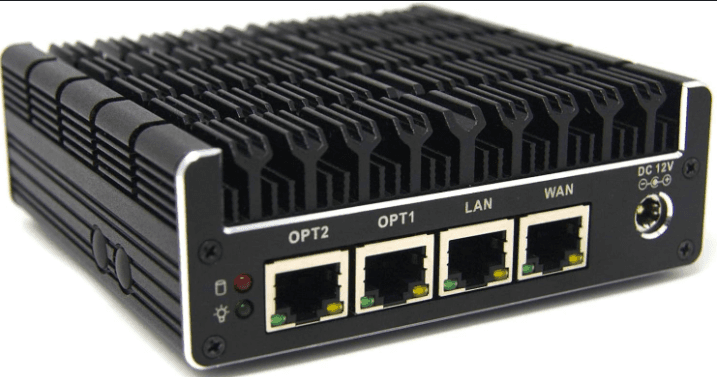
Protectli Vault FW 4B
Technology rarely fails in isolation. Successful attacks often combine a technical weakness, a process gap, and perfectly ordinary human behaviour. Organisations become more resilient when all three improve together: secure equipment, sensible checks, and a culture in which people can speak up when something feels wrong. That is the real subject of this article; the home network is simply where many of those decisions now happen.
Start with the outcome, not the equipment
Before buying anything, ask three questions: what information would cause real harm if it were lost, exposed, or unavailable; which devices and accounts can reach it; and how would you continue working if one were compromised? That is a basic risk assessment, although it does not require a spreadsheet running to forty pages or an enthusiastically coloured heat map. A Finance Director who can authorise payments needs stronger identity controls than the family tablet used for recipes.
No home or business can make an attack theoretically impossible. The practical aim is to remove easy routes in, limit the damage when something goes wrong, and make recovery possible. That proportionate outcome makes the right order of investment much easier to see.
Get the foundations right
The router is the front door of the home network, so begin with the unglamorous settings that do most of the work. Check that it remains supported and enable automatic firmware updates. CISA recommends keeping router firmware current, because known weaknesses provide an avoidable route in. If a router has not been updated for years, replace it before installing elaborate security products behind it.
The router’s administration password is different from its Wi-Fi password. Change default credentials, store a unique password in a password manager, and disable remote administration from the internet unless genuinely needed. Switch off WPS, unused remote access, and unnecessary port forwarding. UPnP lets devices request openings through the router; disable it if unnecessary, then check what stops working.
For Wi-Fi, use WPA3 where devices support it, or WPA2 with AES where older equipment needs compatibility. Avoid WEP and the original WPA standard. Choose a long, unique passphrase, not a surname, address, or reused password. If visitors need a password displayed in the house, make it the guest password rather than the key to every trusted device.
The final foundation is separation. Keep business devices on a trusted network, while visitors and smart devices use a guest or IoT network. Check that the guest setting prevents access to laptops and shared storage, because sometimes “guest” means little more than a second network name. Separation will not make an insecure camera secure, but it can contain the problem. A smart kettle has no legitimate need to know anything about payroll.
Protect the device and the identity
Network security cannot compensate for an unhealthy laptop. Operating systems, browsers, phones, and applications should update automatically. Keep the firewall built into the device and reputable endpoint protection enabled. Encrypt portable devices and set a short automatic screen lock. Where practical, everyday work should use a standard account rather than one that gives every application administrator rights.
Business equipment should normally be managed by the employer, or formally approved where personal devices are permitted. A work laptop should not become the shared household computer simply because it has the better screen. Children are exceptionally effective penetration testers, although rarely on retainer. A business device remains a business asset even on a kitchen table.
Identity deserves as much attention as the device. Email accounts are especially important because they can reset access elsewhere, so use passkeys where they are offered. Otherwise, use a password manager and enable multifactor authentication. The manager creates a different password for each service and normally fills it only on the correct domain. If it refuses to fill a page that looks familiar, check the address before typing anything. An authenticator application is generally preferable to a text message, although either is substantially better than no second factor.
Backups complete the device layer. Follow NCSC guidance on making backups resistant to ransomware and keep a separate, versioned, or isolated copy. File synchronisation is not recovery, because it can synchronise encrypted files with admirable efficiency. Test a restoration: a backup first tested during an incident is an article of faith, not a control.
Use protective DNS, but understand its limits
DNS turns a website name into an address. A filtering service can refuse domains known to host malware, phishing, or criminal infrastructure, protecting many devices when configured at the router. DNS over HTTPS and DNS over TLS encrypt queries to the chosen resolver, although that resolver remains a point of trust. DNSSEC allows a validating resolver to check the authenticity and integrity of DNS data; it does not encrypt the query.
See content credentials

Filtering can block known bad destinations, but miss new or compromised sites, direct IP connections, and files delivered through approved platforms. Applications may also choose another resolver. A DNS filter cannot inspect downloads or read encrypted HTTPS or QUIC content; that requires deliberate decryption using trusted certificates, with technical, operational, and privacy implications. OPNsense or pfSense can add firewalling, separation, and logging, but somebody must maintain it and discover why the quarterly VAT submission was blocked at 11.56 pm. Protective DNS is useful; a transparent appliance is not everybody’s starting point.
Treat smart devices and family devices as a different class of risk
Smart devices are computers wearing novelty outfits. A camera, doorbell, printer, television, or speaker may contain a microphone, storage, cloud access, and software that needs updating. Check the manufacturer’s support period before buying. Afterwards, change default credentials, enable automatic updates and multifactor authentication where available, and disable unnecessary remote access. These steps reflect the NCSC’s practical recommendations for smart devices and provide a useful test for devices already in the house.
Children’s devices need a slightly different approach. DNS filtering can provide a guardrail, but it cannot replace child accounts, application store restrictions, standard access, and conversations about what is being installed. Game modifications, free software, browser extensions, and unofficial applications are common routes to unwanted software. The aim is not to monitor every click; it is to prevent one impulsive installation from compromising the household’s work.
Keep personal and business storage separate. Family photo software should not index investigation evidence, and work documents should not be sent to a personal email account simply because printing is easier there. Convenience has a habit of becoming an undocumented data transfer process. Clear separation protects the business and prevents family members from being drawn unnecessarily into workplace monitoring or an investigation.
Phishing is now a business process problem
Poor grammar and improbable stories have not disappeared from phishing emails, but they are no longer reliable warnings. Generative AI makes fluent, tailored messages cheaper to produce; Microsoft has observed threat actors using it to draft and translate phishing material. Company websites, LinkedIn, social media, and data breaches provide the detail needed to make a request convincing. This is not a new crime, but a better presented version of an old one.
Return to the Friday afternoon payroll request. DNS filtering may block a known false domain, endpoint protection may warn about the page, and multifactor authentication may protect an account if credentials are stolen. None necessarily stops a convincing request to upload information, change bank details, or approve a payment through a legitimate service. The strongest control may therefore be procedural.
Verify requests involving sensitive information or significant payments through a second channel using trusted contact details. Call the Chief Executive on the number in your contacts, not one supplied in the message, and require two people to approve changes to supplier bank details. This only works when employees feel entitled to pause and question senior colleagues. If querying an urgent request is treated as obstructive, the organisation has designed a vulnerability into its culture.
AI creates another risk when employees paste personal, confidential, or privileged information into unapproved tools. Until assessed, treat an AI assistant as an external service: establish what it stores, who can access prompts and files, where the information is processed, whether it is used to improve models, and how it can be deleted. An assistant connected to email, files, or business systems adds another risk: instructions hidden in an email, CV, webpage, or document can become an indirect prompt injection, causing confidential disclosure or an unintended action. The NCSC warns that large language models do not reliably separate instructions from data. Sensible governance means approved tools, data minimisation, limited access, human approval for consequential actions, output checks, and a clear exception process. A blanket ban is not much of a control if people already use AI quietly.
Employers still own their part of the risk
Corporate security does not transfer to employees because work happens in their homes. Employers should provide or approve supported equipment, secure access, multifactor authentication, endpoint management, backups, and clear reporting. Access should reflect the user, device condition, and resource sensitivity. This is the practical core of Zero Trust: confidence comes from identity, device, and context, not merely from being “inside” a familiar network. For a UK SME, Cyber Essentials provides a manageable baseline.
The ICO’s employer checklist for home working is under review following the Data (Use and Access) Act, but its central principle remains useful. Under UK GDPR, organisations remain responsible for appropriate technical and organisational measures, including approved technology, training, access controls, secure disposal, and incident response. Employees must use approved systems, protect devices and conversations, store papers securely, lock screens, and report mistakes. A credible policy recognises both sides; it does not pretend every home worker has acquired a private IT department.
Monitoring needs particular care because DNS, endpoint, and access logs can reveal what a worker is doing. An organisation should define its purpose and lawful basis, minimise collection, restrict access, protect the records, set a retention period, and explain the monitoring clearly. Working from home is not permission to monitor the household. Reporting must also feel safe: people delay asking for help when they expect punishment, and that lost hour can cause more damage than the original mistake.
When the office travels
Public Wi-Fi is not automatically a den of thieves, and HTTPS has made casual interception harder. It remains beyond the worker’s and employer’s control. For sensitive work, a mobile hotspot is often simplest. When public Wi-Fi is unavoidable, confirm its name, disable automatic joining and file sharing, keep the firewall enabled, and never ignore certificate warnings. Use the approved VPN or secure access service where required. A VPN protects traffic in transit; it does not make a compromised laptop healthy or a phishing page honest.
Physical security matters away from home. Keep the device with you, use a privacy screen where appropriate, and consider who can hear a confidential call. The person reading a redundancy spreadsheet over your shoulder does not need sophisticated malware. Security on the road therefore combines technical controls with awareness of the people and environment around you.
Plan for the bad day
Security is incomplete without recovery, so write down what happens if a device behaves strangely, credentials are entered on a suspicious site, a phone is lost, or information reaches the wrong person. Speak to IT before wiping a business device, because its logs and files may be evidence. From a clean device, change exposed passwords and revoke active sessions; preserve the suspicious message and record what happened while it is fresh. Keep reporting details somewhere accessible without the affected laptop.
Digital forensics and good people management meet here. Evidence is easier to preserve when the process is calm and free from blame; recovery is faster when backups and contact arrangements have been tested. A simple incident plan makes the first decisions obvious, preventing confusion and embarrassment from enlarging a manageable problem.
A sensible order of work
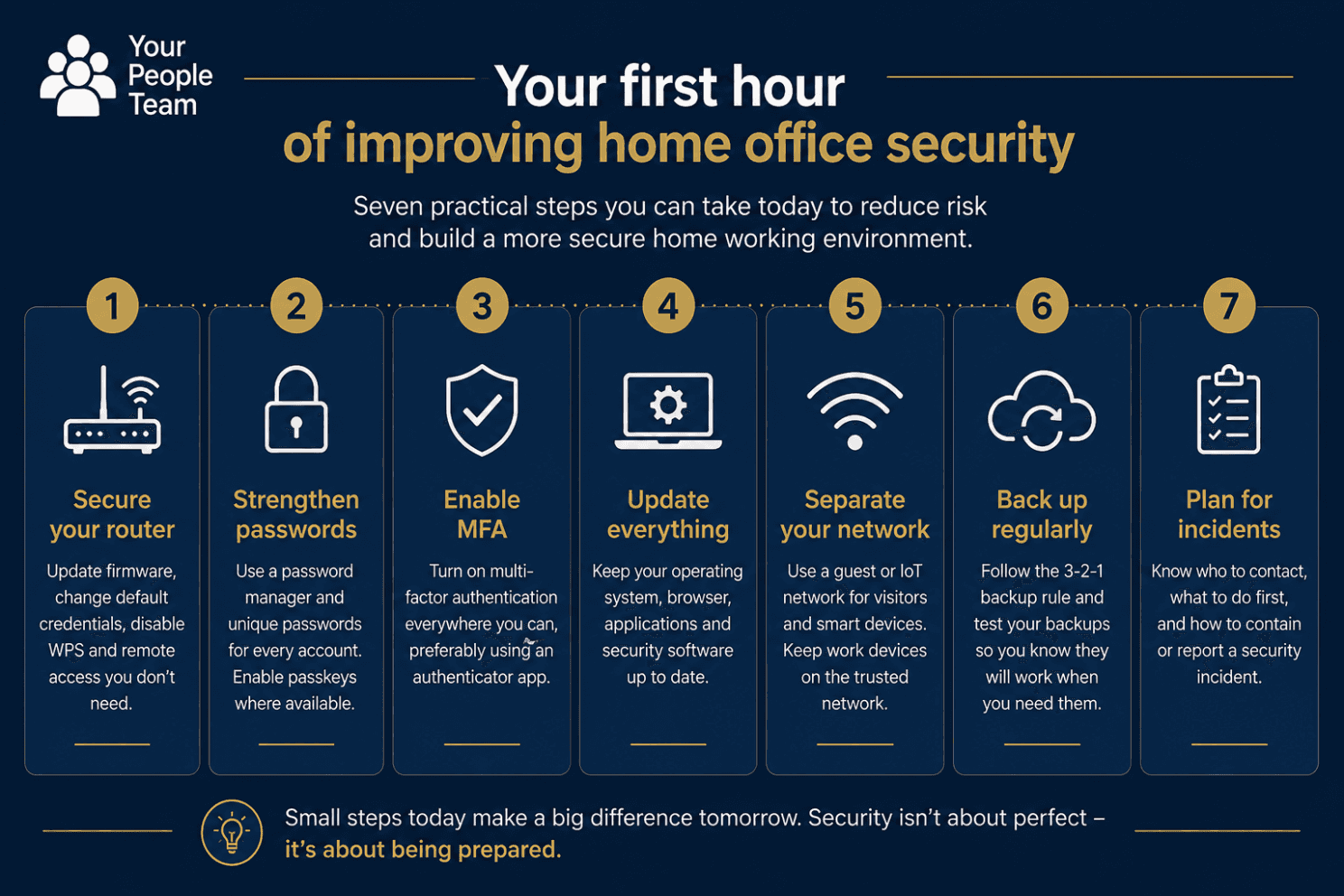
If you have one hour, use it on the controls most likely to matter, in this order:
Update the router, confirm that it remains supported, and change its administration password.
Use WPA3, or WPA2 with AES, together with a long and unique Wi-Fi passphrase.
Turn on automatic updates and the device firewall, encrypt the entire disk, and set automatic screen locking.
Use a password manager and multifactor authentication, beginning with the main email account.
Separate work devices from visitors and less trusted smart devices, then test that the separation works.
Confirm that important data is genuinely recoverable from a separate backup.
Agree how unusual requests and suspected incidents will be verified, reported, and handled.
A dedicated firewall, intrusion detection, and more extensive logging should follow only when the risk justifies them and someone is willing to maintain them. Complexity is not protection if it is left unpatched, misunderstood, or quietly bypassed because it makes normal work too difficult.
See content credentials
Return to the HR Director at 16:52 on Friday afternoon. Every control here exists to help her make one better decision under pressure: pause, verify the request through a trusted channel, and report it without fear of blame. Technology, training, and process matter, but security ultimately succeeds when ordinary people can recognise that something is unusual and feel confident enough to question it. Build understandable layers and make the safe action the easy one. That is how a secure home office, and a resilient organisation, survives contact with real life.
Need help turning this into something practical? Your People Team can support your organisation with security for home working, resilience, AI governance, and the people processes that make the controls effective, including direct technical assistance through our trusted specialist partners.